
▣ BUILT FOR PHOTOGRAPHERS
Capture. Create.
Capture. Create.
Preserve.
ÀYỌ̀ is a local-first Windows photo editor combining professional adjustments with on-device AI-assisted portrait analysis, RAW workflow tools and private client proofing.
▣ Windows 10/11 (64-bit) • Current builds are actively in development

‹›
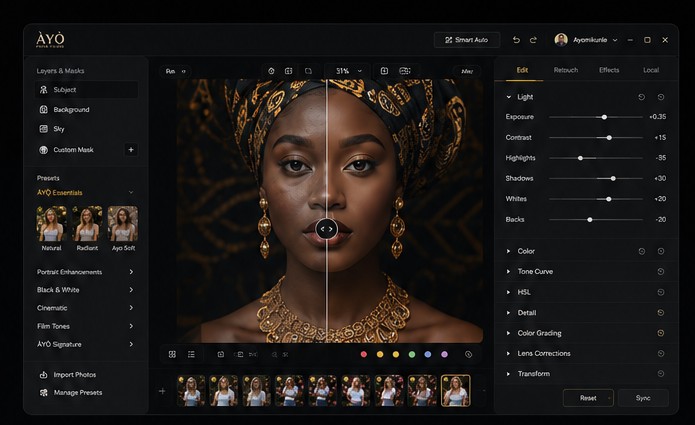
BeforeAfterPROFESSIONAL EDITINGUseful controls.
Useful controls.
A focused workflow.
ÀYỌ̀ keeps originals intact while edits, project state and retouch settings are managed inside the project workspace.
- Exposure, contrast, highlights, shadows, whites and blacks
- Temperature, tint, saturation, vibrance, tone curve and HSL controls
- Heal, Remove and Clone brush workflows
- AI-assisted face, skin, hair and background targeting
- JPEG/PNG export plus 16-bit PNG/TIFF when a RAW master is available
Intelligence where it helps. Control where it matters.
Smart Skin 2.0
Local confidence-aware skin analysis provides smoothness, roughness, tone and blemish-candidate information. The learned lesion model is still a gated future milestone.
Smart Auto 3.0
Analyzes image statistics locally and builds a conservative tonal, color and detail starting recipe.
Heal / Remove / Clone
Brush-based cleanup for blemishes, threads and other small distractions, with photographer control.
Presets, Match & Sync
Built-in and custom presets, statistical Color Match, exact Sync Edits and adaptive Smart Sync.
Export & Client Proof
Choose an export folder, add positioned watermarks, and share optimized proof previews without uploading RAW originals.
Local-first core
Core portrait inference and editing are designed to run on the photographer's computer; cloud use is explicit.
Persistent project workspace
Projects, settings and managed editing state are stored in a shared local ÀYỌ̀ workspace so work can be resumed.
Private client proofing
Only optimized proof previews are uploaded for gallery selection; originals and RAW masters remain local.
See what ÀYỌ̀ can do today.
Explore the current feature set, check the live plan pricing, or download the latest Windows build published by the admin portal.